








Device Support Guide
Does my DTU support Local Control?
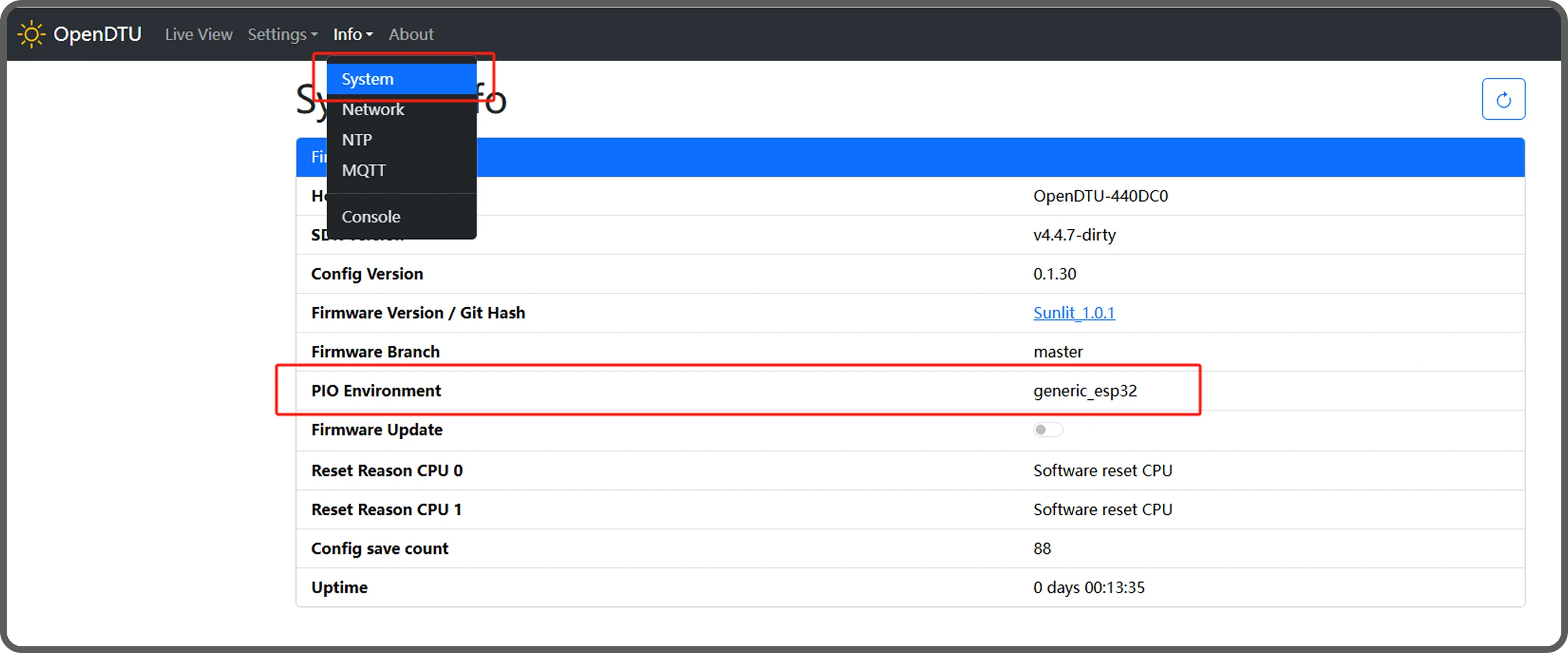
Condition: DTU's PIO Environment must be selected as "generic_esp32".

If the condition is met:
The DTU supports Local Control.
Firmware upgrade is required. Please follow the App guidance.

If the condition is not met:
Doesn't support Local Control.
Steps to Check PIO Environment:
1. Connect a device (PC/phone) to DTU's AP network.
2. Access the IP address via the browser: http://192.168.4.1
3. Log into DTU backend:
Username: admin
Default password: openDTU42
4. Navigate to [Info] → [System]
5. Verify PIO Environment is generic_esp32.
(Refer to image below)
Devices Supporting Local Control
Deye Microinverters (all conditions must be met)
Rated power <= 2000W
Inverter firmware version ≥ V0.2.4.0
WiFi module firmware = Non-encrypted version (Switch via App guidance)
APS Microinverters
APsystem EZ1-M models only
ShellyPro3EM & Shelly3EM
